

Physical Buttons vs Touchscreens: Used-Car Tech Guide
Used-car technology guide
Physical buttons vs. touchscreens: what Volkswagen’s change means for used-car shoppers
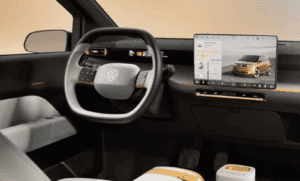
Volkswagen’s move back toward more physical controls is part of a bigger shopper conversation: modern cars need great technology, but drivers still want quick access to climate, volume, defrost, hazard lights, and other everyday controls without hunting through menus.
Quick answer
Touchscreens are useful for deep features
Navigation, media, vehicle settings, phone projection, camera views, and connected services often work well through a large central screen.
Physical controls still matter for repeat actions
Climate temperature, fan speed, defrost, volume, hazard lights, drive modes, and seat heat are easier for many drivers when they have a button, knob, or toggle that can be found by feel.
Used-car shopping tip: do not judge the cabin only from photos. Sit in the vehicle, pair your phone, adjust climate, change audio, use the backup camera, and make sure the controls feel natural before buying.
What to check on a test drive
| Feature area | What to test | Why it matters |
|---|---|---|
| Climate controls | Change temperature, fan speed, defrost, and seat heat while parked and while driving safely. | Climate controls are used constantly, especially in Midwest weather. |
| Audio and phone | Pair your phone, test calls, change volume, skip tracks, and use voice commands. | Phone integration is only valuable if it feels easy every day. |
| Backup camera and sensors | Shift into reverse, inspect camera clarity, parking lines, alerts, and delay. | Camera and sensor issues can affect confidence in tight lots and driveways. |
| Menus and settings | Find driver assistance, lighting, safety, display, and vehicle settings. | Important settings should not be frustrating to access or understand. |
| Physical wear | Check knobs, buttons, haptic sliders, screen touch response, and steering wheel controls. | Interior controls are wear items. Sticky buttons or laggy screens can become daily annoyances. |
Why this matters when buying used
Cabin design affects ownership satisfaction
Two used vehicles can have similar mileage, price, and safety equipment but feel completely different in daily use. A clean interface can make a car feel newer; a frustrating one can make even a nice vehicle harder to live with.
Technology should support the drive
Apple CarPlay, Android Auto, navigation, driver-assistance features, and cameras are helpful when the controls are predictable. The goal is not more screens; the goal is less distraction and better control.
Model years can differ a lot
Automakers often change steering wheel controls, infotainment software, climate-control layouts, and screen sizes between model years. Always compare the exact vehicle you are considering.
Service and diagnostics matter too
If a screen, sensor, camera, or module acts up, diagnostic support matters. Cooper Automotive can help Craig & Landreth shoppers with inspection, diagnostics, tires, brakes, and routine service needs.
Shop used vehicles by how they feel in real life
Craig & Landreth helps shoppers compare used Volkswagens and other cars, trucks, and SUVs by condition, history report, payment, trade value, technology, and service support near Clarksville, Jeffersonville, Louisville, and Southern Indiana.
Helpful next pages
Physical controls and touchscreen FAQs
Are physical buttons better than touchscreens?
Neither is automatically better for every feature. Touchscreens work well for navigation, media, and deeper settings. Physical controls are often easier for frequent actions like climate, volume, defrost, and hazards.
Should I avoid a used car with touchscreen controls?
No. Many touchscreen systems work well. The key is to test the exact vehicle, make sure the screen responds properly, and confirm that important controls are easy for you to use.
What technology should I test before buying a used car?
Test phone pairing, Apple CarPlay or Android Auto, backup camera, parking sensors, climate controls, steering wheel buttons, audio controls, driver-assistance settings, and screen response.
Can Craig & Landreth help me compare used vehicles with better technology?
Yes. Craig & Landreth can help you compare used vehicles by year, trim, features, history report, financing, trade value, and ownership needs.
0 comment(s) so far on Physical Buttons vs Touchscreens: Used-Car Tech Guide